
Batch renaming for macOS
Hundreds of files.
Neatly named.
flowRename renames photos, music and documents by your rules in seconds – and shows you every change live, before a single file is touched.
As simple as it gets
-
1
Drop your files
Drag files or folders into the window – or right-click in the Finder and choose “Rename with flowRename…”.
-
2
Stack your rules
Find & replace, numbering, dates, metadata … combined any way you like. Drag to set the order.
-
3
Check & rename
The preview highlights every change. ⌘↩ – done. And ⌘Z if you change your mind.
Live preview
See every change before it happens.
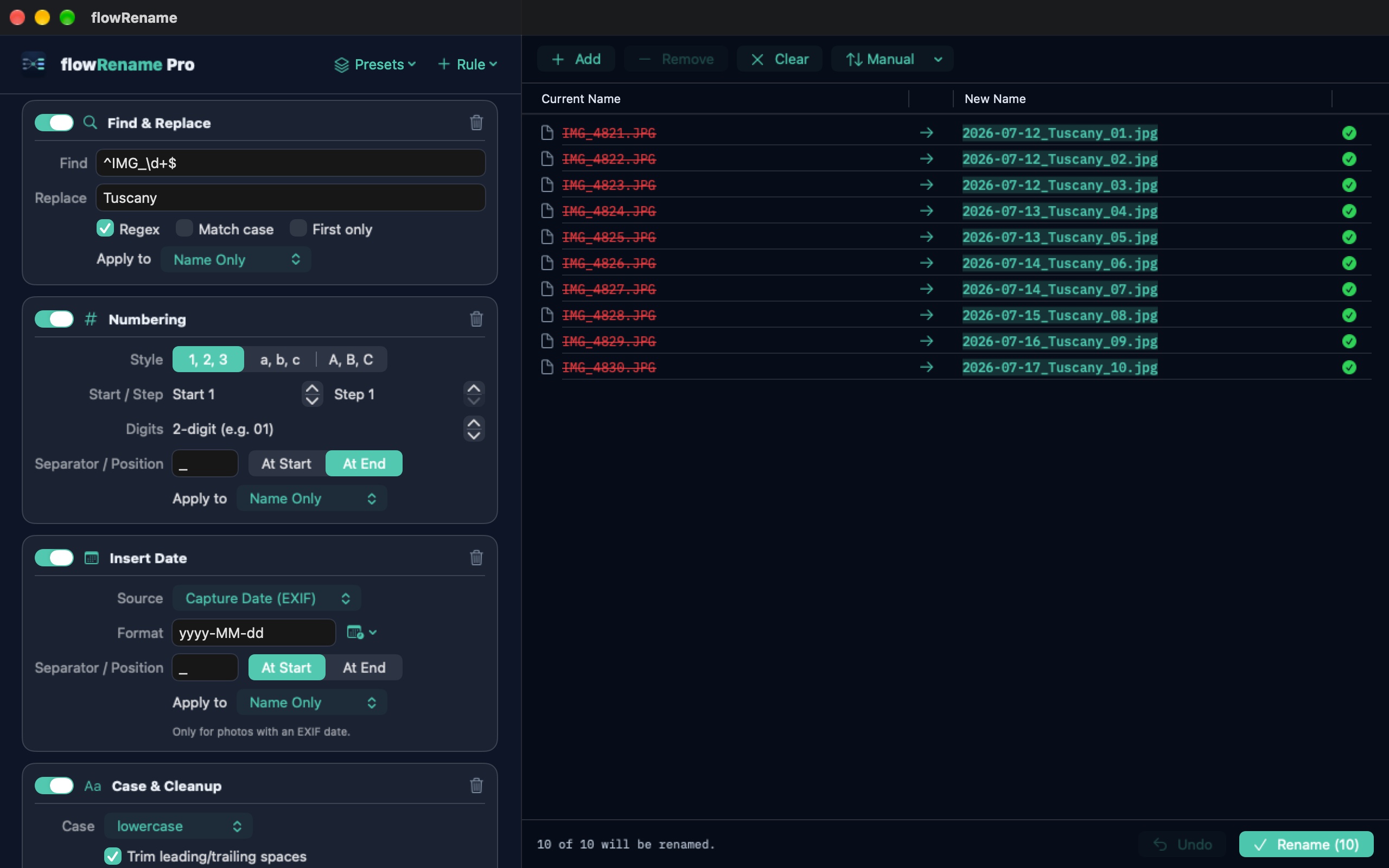
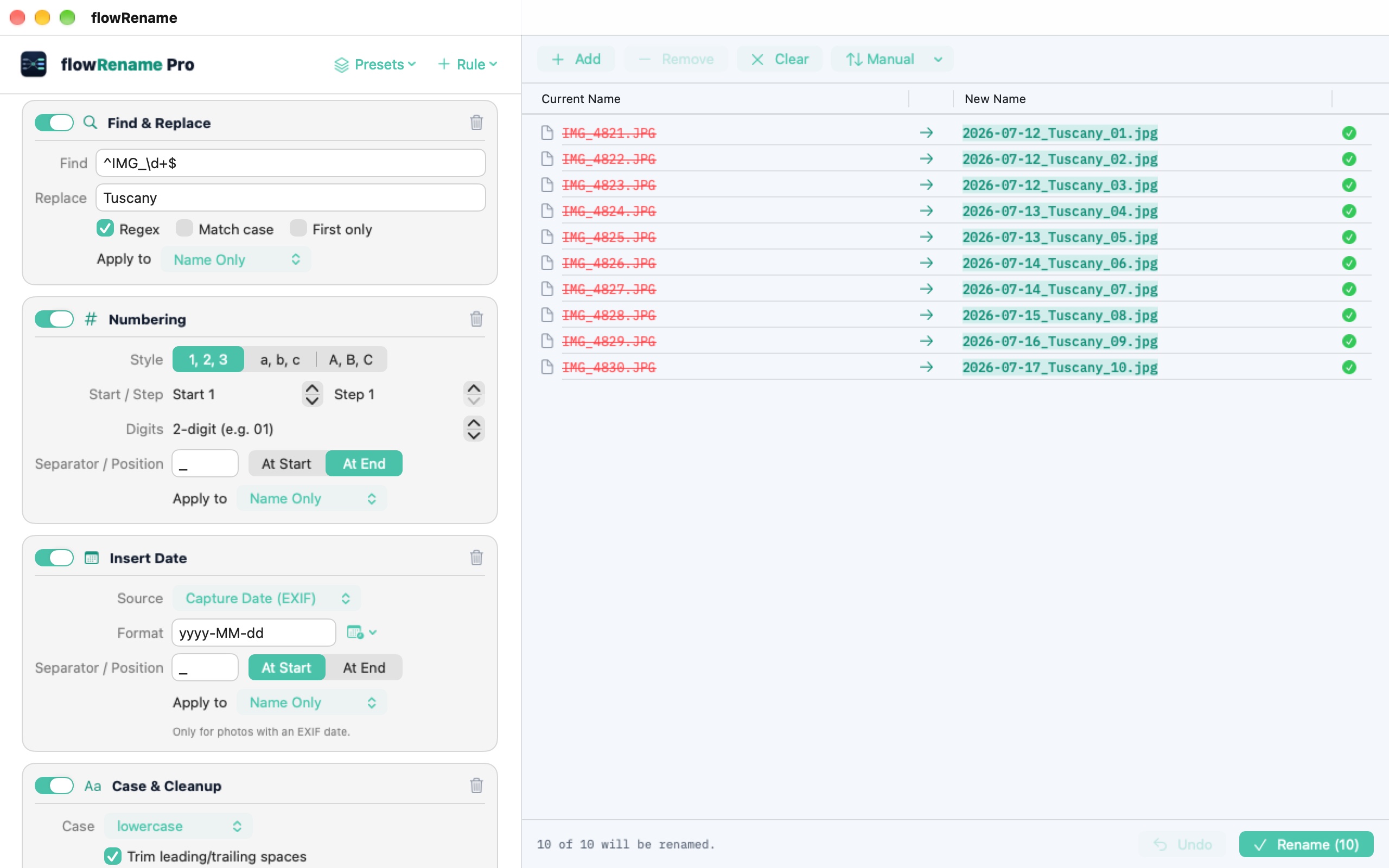
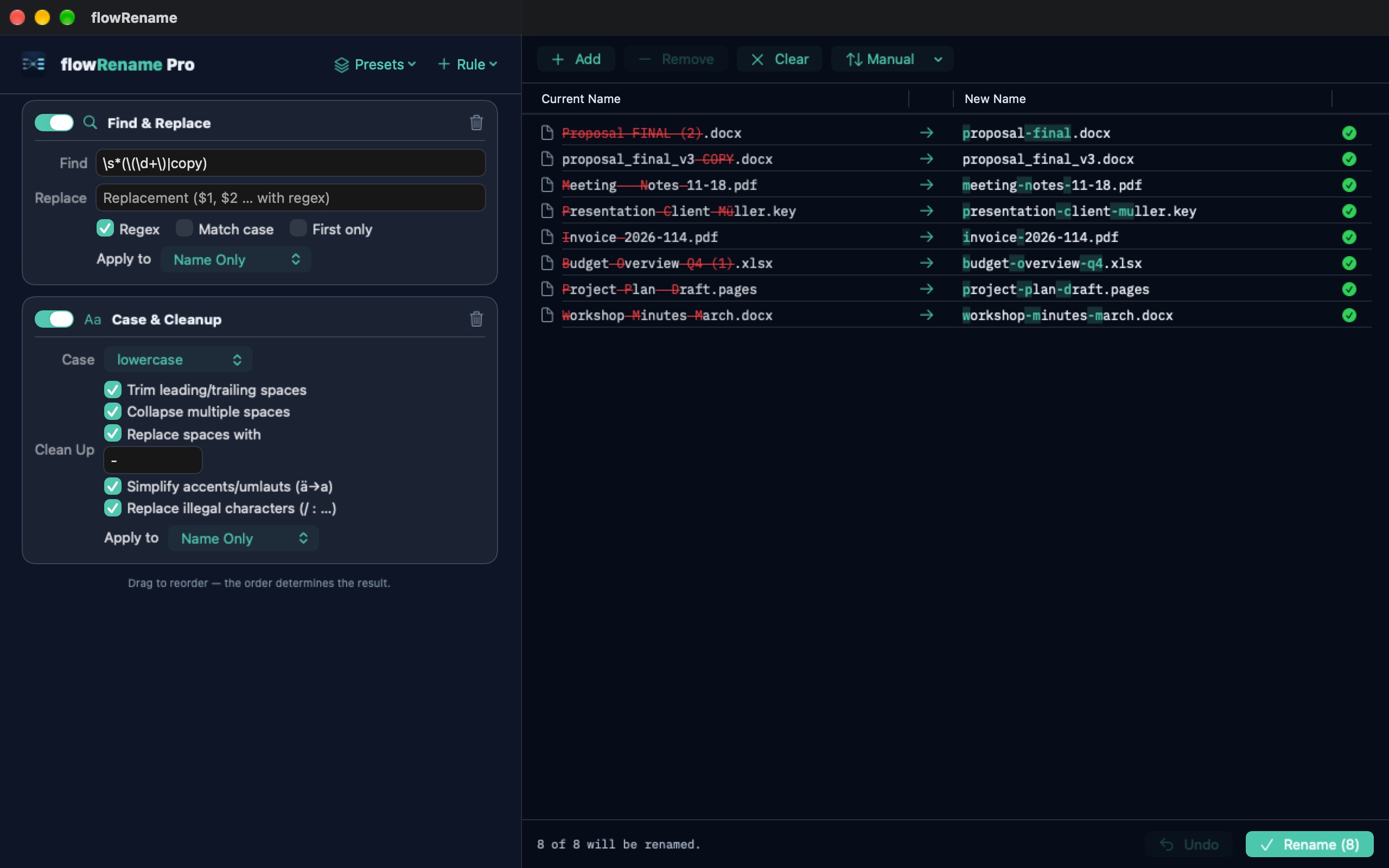
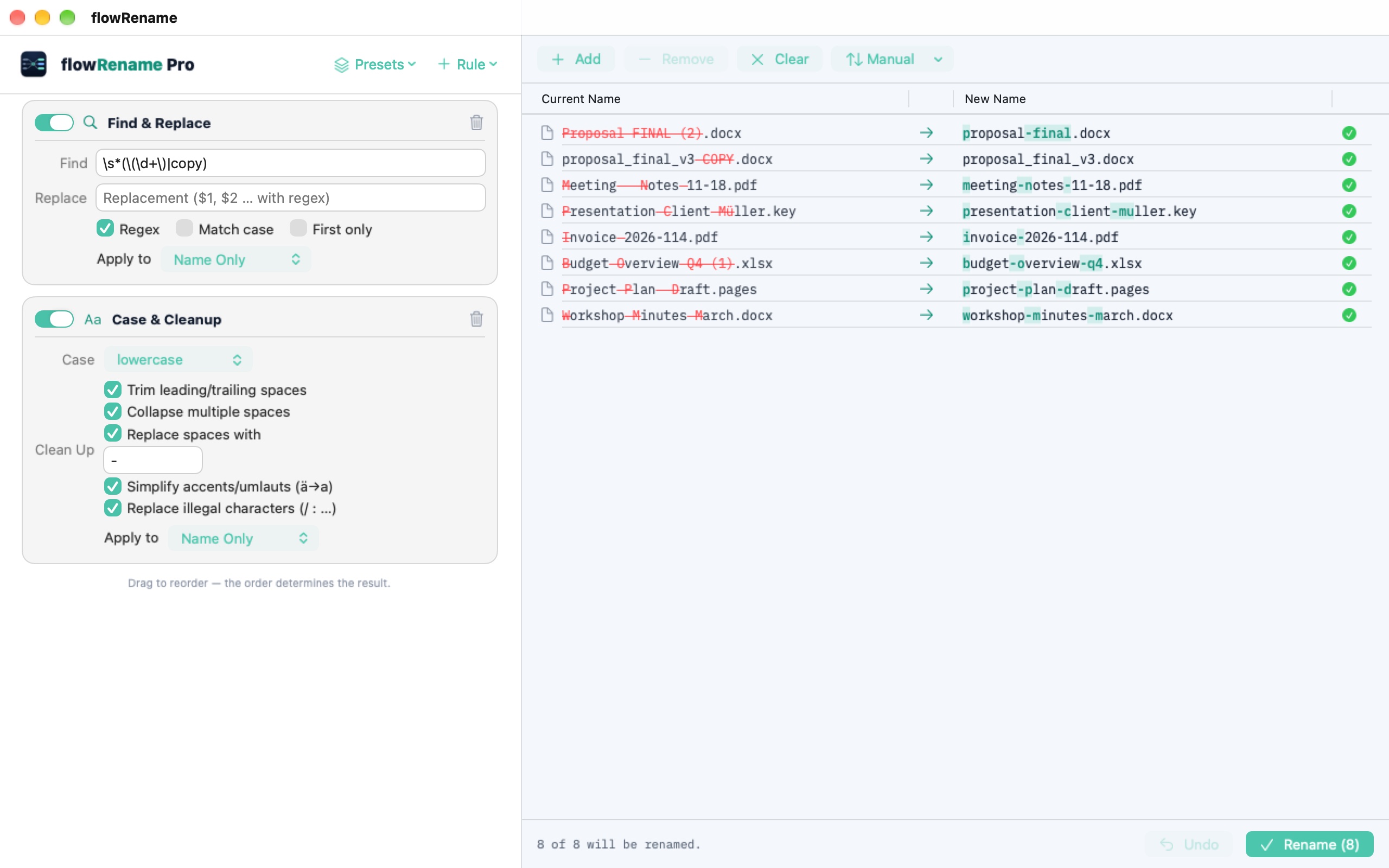
As you adjust your rules, flowRename recalculates the new names instantly. Whatever gets removed is struck through, whatever is added is highlighted – character by character.
- Name conflicts are detected and made unique automatically
- Accents, umlauts and illegal characters cleaned up on request
- Undo with ⌘Z – as long as the app is open
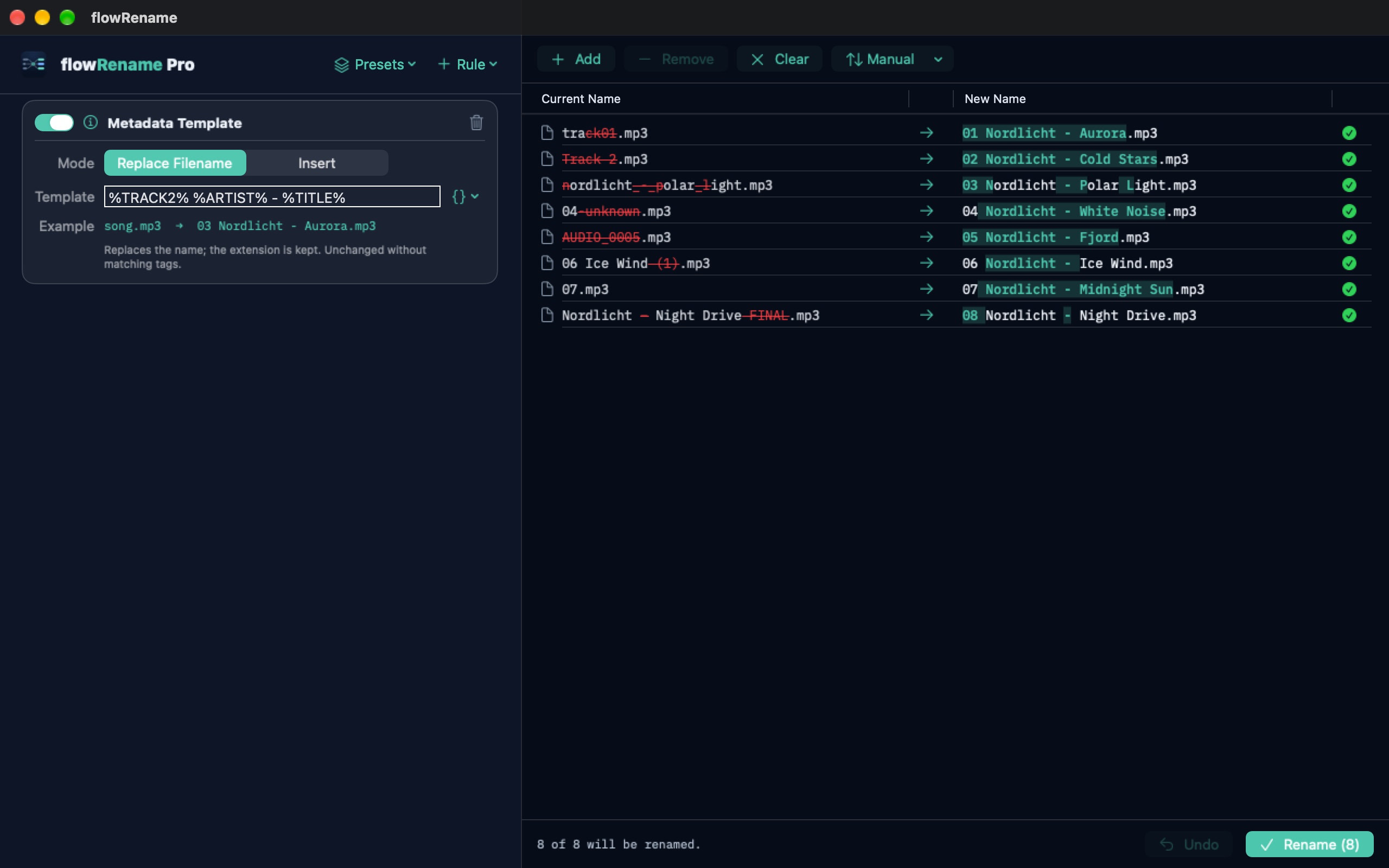
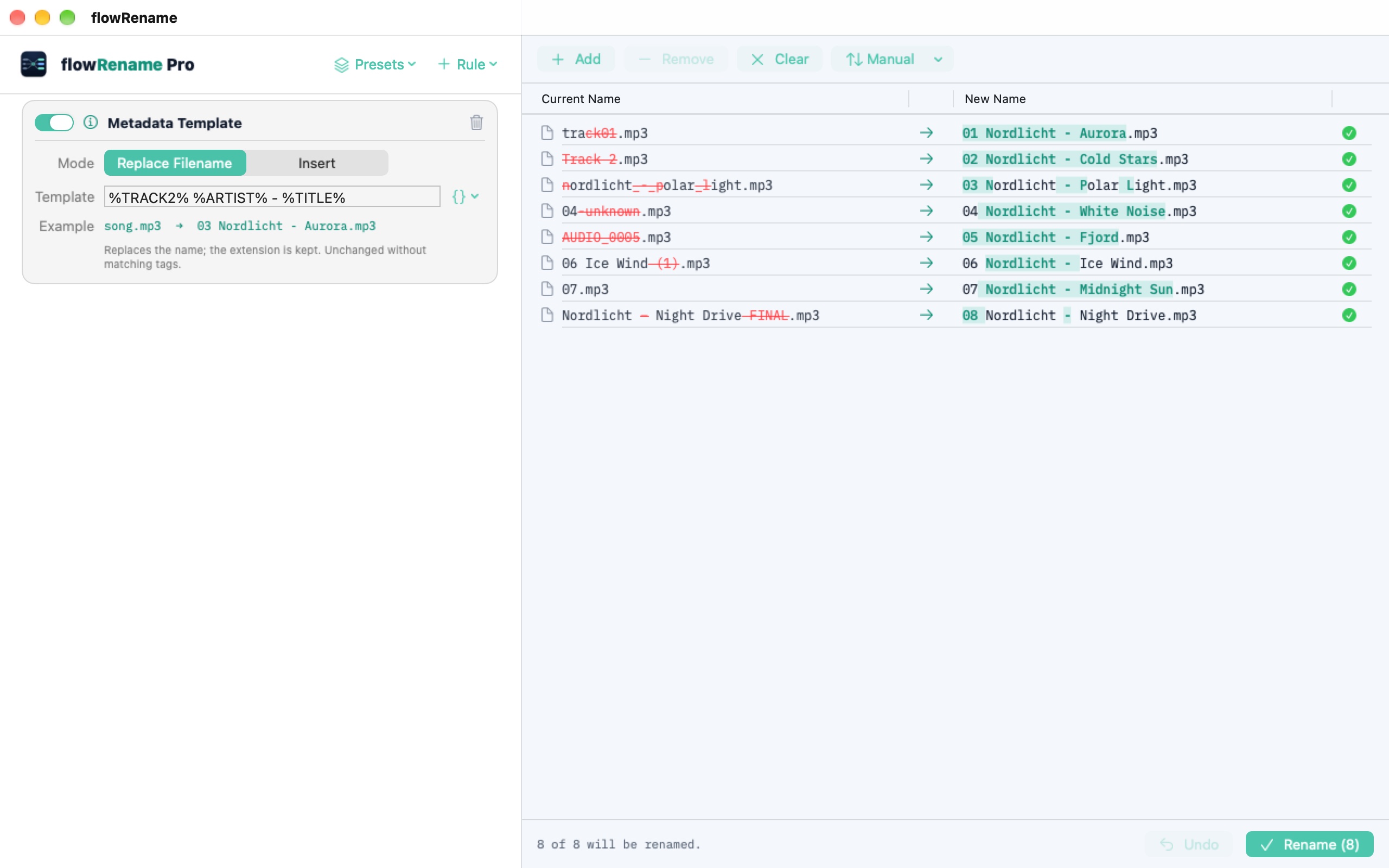
Metadata templates
Name your music by its tags.
One template, any number of files: placeholders like
%TRACK2%, %ARTIST% or %TITLE% are filled from
each file’s tags. If a value is missing, flowRename tidies up separators and spaces
on its own.
%TRACK2% %ARTIST% - %TITLE%track01.mp301 Nordlicht - Aurora.mp3Track 2.mp302 Nordlicht - Cold Stars.mp3AUDIO_0005.mp305 Nordlicht - Fjord.mp3
%TITLE%%ARTIST%%ALBUM%%TRACK2%
%YEAR%%GENRE%%DIMENSIONS%%CAMERA%
%NAME%%DATE:yyyy-MM-dd%
Dates & numbering
Photos in order – by capture date.
IMG_4821.JPG becomes 2026-07-12_Tuscany_01.jpg.
flowRename reads the EXIF capture date straight from the file and combines it
with text and a running number.
- Capture, digitized, creation, modification or date added
- Any format you like – from
yyyy-MM-ddtodd.MM.yyyy_HH-mm - Numbers as 1, 2, 3 · 001, 002 · a, b, c
Features
Everything that’s tedious about renaming – handled.
-
Find & Replace
Plain text or regular expressions with groups (
$1), optionally first match only. -
Numbering
Start, step, number of digits and position – with digits or letters.
-
Insert Date
EXIF capture date, created, modified, date added or today – in any format.
-
Metadata Templates Pro
Combine audio tags and image data into complete names with placeholders.
-
Limit & Trim
Cap names at a maximum length or cut a fixed number of characters from the start or end.
-
Case & Cleanup
Letter case, spaces, accents and illegal characters in one step.
-
Conflict Detection
Duplicate target names are detected and made unique with
(1),(2)… -
Undo
Every rename can be fully reverted with ⌘Z.
-
Finder Integration Pro
Right-click files in the Finder – and they land straight in flowRename.
-
Presets Pro
Save rule combinations and load them with one click – optionally at launch.
-
Sort & Arrange
Sort by name, date, size or kind – or drag rows into place.
-
Light & Dark
Follows the system or your choice – with a calm, clear design.
Free & Pro
Start for free. Go Pro when you need more.
Free
$0
Everything for everyday tidying:
- Live preview with change highlighting
- Undo and conflict detection
- Find & replace, insert, numbering, case, trimming
- Dates: created, modified, added or today
- Up to 20 files per run
- Up to 2 rules combined
- All 11 languages
Pro
$9.99 one-time
Everything in Free, plus:
- Any number of files per run
- Combine any number of rules
- Regular expressions
- Metadata templates and EXIF dates
- Save your own presets
- Add folder contents recursively
- Finder context menu
An in-app purchase in flowRename – no subscription. Prices may vary by country.
Compare all features
| Feature | Free | Pro |
|---|---|---|
| Basics | ||
| Live preview with change highlighting | ||
| Sort and reorder files | ||
| Undo and conflict detection | ||
| Fully local, no account | ||
| 11 languages, light and dark | ||
| Limits | ||
| Files per run | up to 20 | unlimited |
| Combined rules | up to 2 | unlimited |
| Rules | ||
| Find & replace | ||
| Regular expressions | – | |
| Insert text and numbering | ||
| Change case | ||
| Limit length, remove characters | ||
| Date: created, modified, added, today | ||
| Date: EXIF capture and digitized | – | |
Metadata templates (e.g. %ARTIST% - %TITLE%) | – | |
| Workflow | ||
| Apply the built-in presets | ||
| Save your own presets | – | |
| Add folder contents recursively | – | |
| Finder context menu | – | |
Your files stay on your Mac.
flowRename works entirely offline. No account, no cloud, no tracking – only the names change, the contents of your files stay untouched.
Localized
Speaks your language – 11 of them.
flowRename follows your Mac’s language automatically: menus, rules, messages and the Finder context menu. You can also set a different language per app in System Settings › General › Language & Region.
- English
- Deutsch
- Français
- Español
- Italiano
- Nederlands
- Português (Brasil)
- 日本語
- 한국어
- 简体中文
- 繁體中文
Frequently asked questions
How much does flowRename cost?
flowRename is free. A one-time in-app purchase of $9.99 unlocks Pro: any number of files and rules, regular expressions, metadata templates and EXIF dates, your own presets, recursive folders and the Finder context menu. No subscription.
What do I need to run flowRename?
A Mac with macOS 14 Sonoma or later.
Which languages is flowRename available in?
In 11 languages: English, German, French, Spanish, Italian, Dutch, Portuguese (Brazil), Japanese, Korean, and Simplified and Traditional Chinese. The app automatically uses your Mac’s language.
Can I undo a rename?
Yes. ⌘Z restores the previous names – even several steps in a row, as long as flowRename is open.
Does flowRename change my files?
Only their names. Contents, metadata and location stay exactly as they are.
How do I enable the Finder context menu?
Turn on the flowRename extension once in System Settings › General › Login Items & Extensions. After that, “Rename with flowRename…” appears in the Finder’s right-click menu. flowRename also shows the status in its own settings.
Why does flowRename ask for access to a folder?
macOS protects your files: apps from the App Store may only access what you allow. To rename, flowRename needs the folder a file is in, so it asks once per folder and remembers your answer. If you prefer, you can grant your whole home folder in the settings. You can revoke access there at any time.
Does it work with folders?
Yes. Folders are either renamed themselves or – via a setting – added with all of their contents.
Which metadata can flowRename read?
For photos: capture and digitized date, dimensions and camera model. For audio files: title, artist, album, track number, year and genre. Plus the creation, modification and added date of every file.

More order. Fewer clicks.
flowRename is coming soon to the Mac App Store.
Coming to the Mac App Store